An open chord synth, grown on a handheld.
One hand holds a chord type (Dim, Min, Maj, Sus) and the extensions (6, m7, M7, 9), the other plays the root, and out comes a whole chord, voiced, with its bass. Performances (strum, arpeggio, pattern, harp), a Beat and an event looper let you build loops while you play: everything is played, nothing is programmed in steps. Stame does all of it on a Miyoo Flip, played with an Akai MPK mini IV and a fifteen-key macro pad. Then, with more keys, more knobs and more power than the original, a little more.
Phase 1 · showcase 0.1 running on the Flip · phase 2: dedicated hardware
One finger, one chord. A whole band, if you keep going.
Stame grew out of a small synth with eight chord buttons on the left and one octave of keys on the right. Hold Min and press F♯: you get an F♯ minor chord, voiced in a window you choose with a dial, with a bass note under it. Add an extension (6, m7, M7, 9), let a performance play it for you (strum, arpeggio, pattern, harp), start a beat, record a loop, overdub. It is an instrument for people who hear chords before they can name them.
Stame reproduces that behaviour: the chord logic, the Secret Chords, the voicing windows, Key mode and transpose, the bass, the performances, the beat and the looper, the MIDI. It is described in a functional specification written from the public manual and from observation, before the first line of code; it holds no factory data of the original. The core is plain C11 — no heap, no I/O — so the same engine can move to dedicated hardware in phase 2.
Where the original has eight encoders and a 128×128 OLED, Stame has a keyboard, a macro pad and a 640×480 colour screen. The rule is simple: everything the original does, Stame does, and that behaviour is never altered. Then, because there are more keys, more knobs and more CPU, it does a little more — a sampler, sampled drum kits, a knob Lock, a view key.
The name, the greenhouse, the botanist
In a flower the stamen carries the pollen and the pistil receives it: Stame is the part that gives.
The rest of the identity comes from a greenhouse of the 1970s, the years of The Secret Life of Plants and of Mort Garson's Plantasia, Moog music «for plants and the people who love them». Stame is the synth that greenhouse would have had: a wooden console with a display that lights up like a slide under a microscope.
And from Linnaeus, who in 1735 classified plants by counting their stamens: one, Monandria; two, Diandria; three, Triandria. Stame keeps the rule: one note is one stamen. A triad is Triandria, a seventh chord Tetrandria, and the boot screen reads Stamen harmonicum, class Triandria. The chord name is set in dots, like a vacuum fluorescent display.
Three devices, one instrument.
Left hand on the pads, right hand on the keys, the macro pad a palm away, the Flip above it with the screen facing you.
Akai MPK mini IV
The eight pads are the original's chord buttons (Dim, Min, Maj, Sus / 6, m7, M7, 9); the keys give the root; the eight knobs turn Sound, Perform, FX, Key, Bass, Loop, BPM and Volume; the transport is the looper.
Macro pad
Fifteen keys and three detented, pushable knobs. The keys do what the original lacks: Hold, tap tempo, metronome, fill, four scenes, Save Loop, DRUMS; the big knob is the Chord Voicing dial. T13 is the Drop, T14 the View, T15 the Page.
Miyoo Flip
The brain and the display: a 640×480 screen on a hinge, a Cortex-A55 running the synth at 48 kHz. Its own controls always work: the buttons move a focus and open the controls page and the menu, the left stick bends and modulates, the right one moves the two voicing windows, L2 taps the tempo and R2 holds a fill.
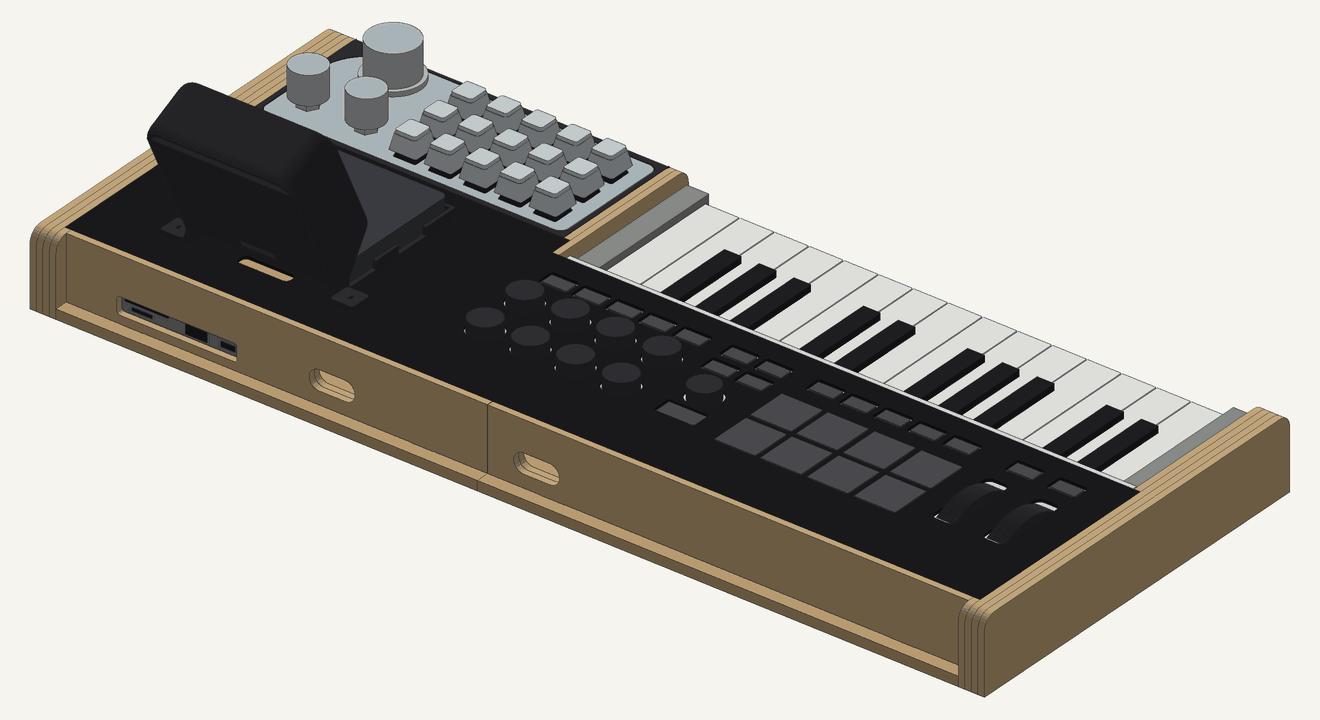
In the wooden console they sit like this: the MPK on the left, the pad in its cradle in line with the keys, the Flip open above the pad, so the screen never covers the keys. The rendering is further down, in the Case section.
A calm slide of fluorescent glass.
While you play, the screen shows four things: the chord, the tempo, the keyboard and the control you just touched. Everything else arrives when you ask for it.
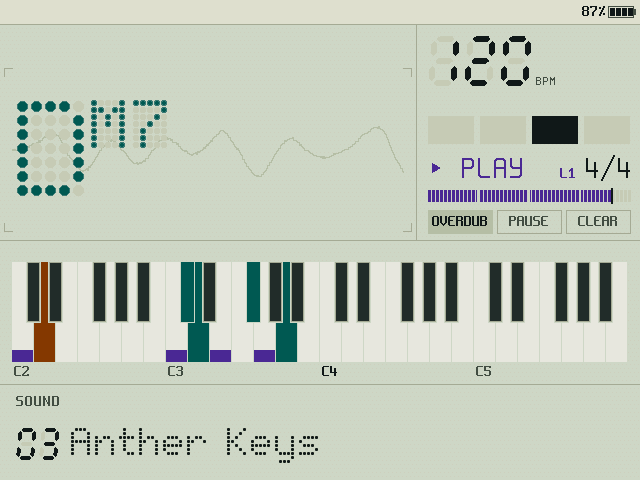
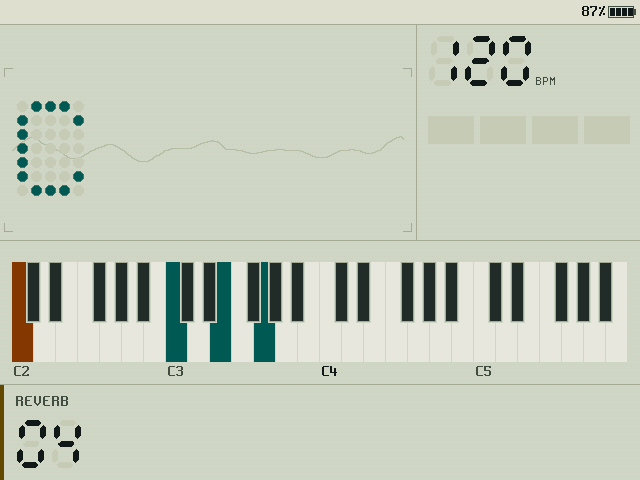
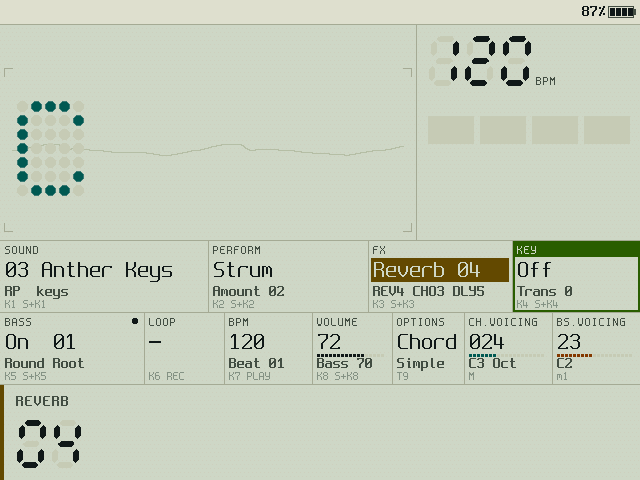
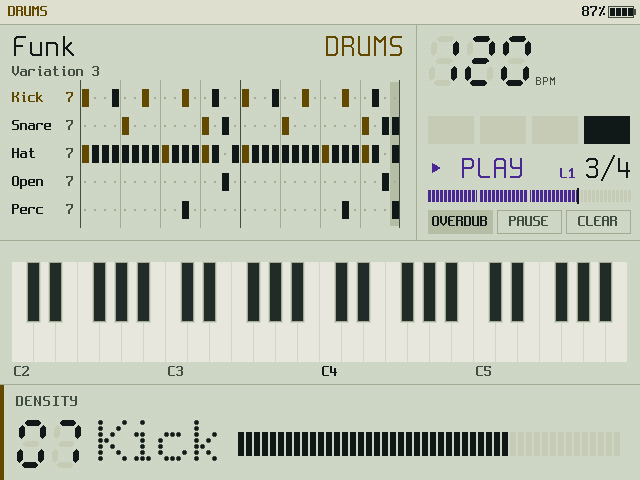
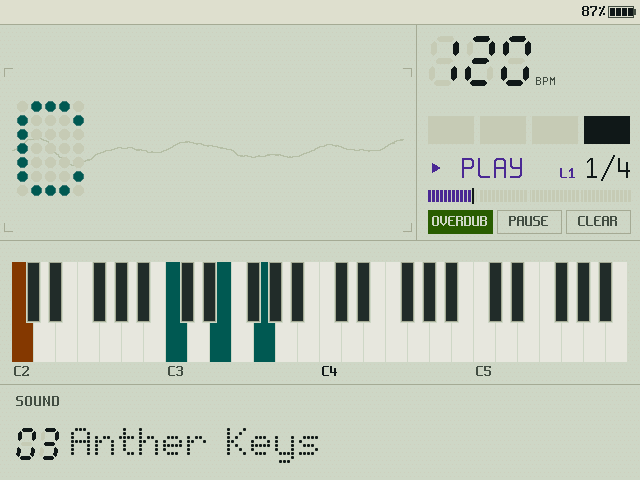
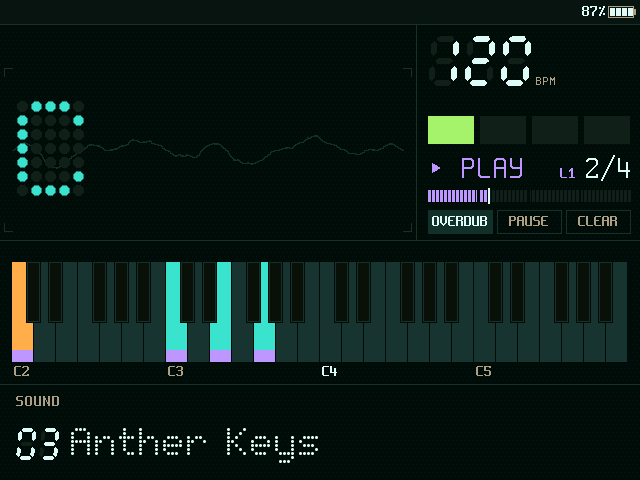
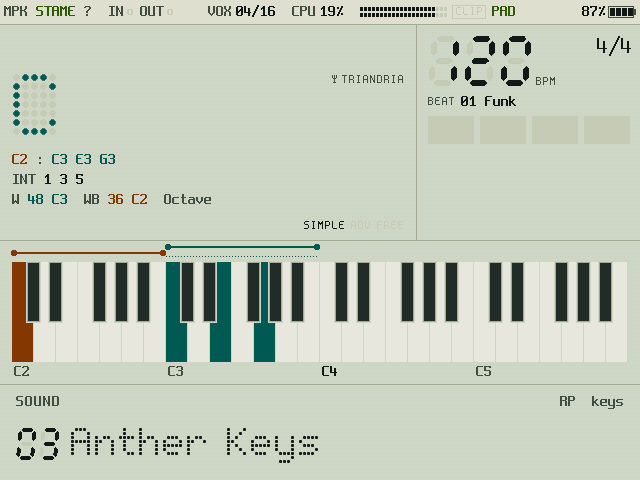
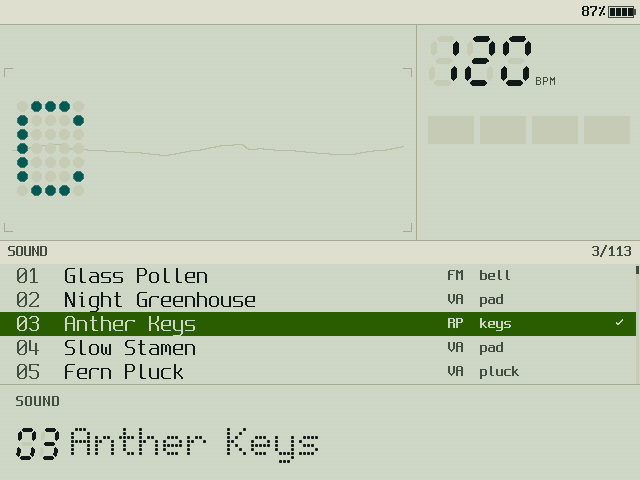
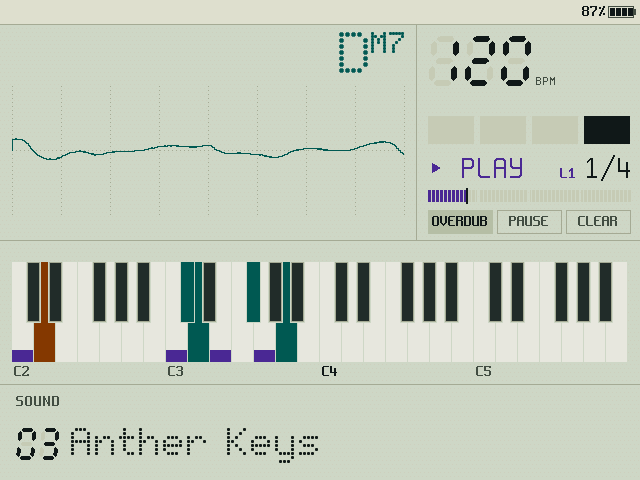
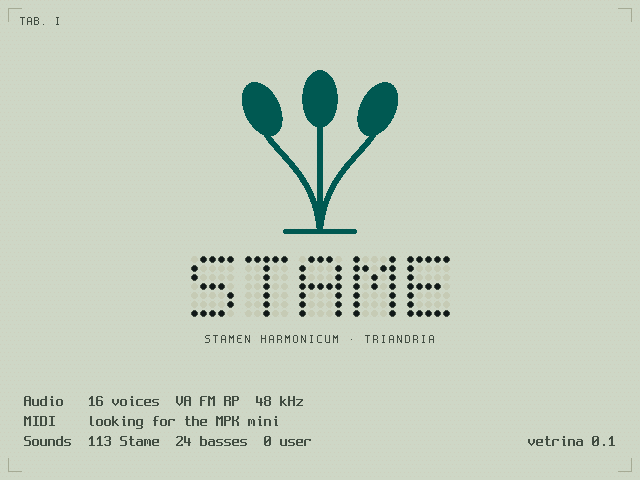
Three synth models, a sampler, forty-three drum kits, sixteen voices.
Two engines, Sound and Bass, share a pool of sixteen voices at 48 kHz, with two FX slots each, a delay and a reverb. Everything is 32-bit float C11 that also compiles for a Cortex-M7.
VA
Four band-limited oscillators, noise, a state-variable filter, four envelopes, four LFOs and an eight-slot modulation matrix.
FM
Four operators, eight algorithms, feedback on the fourth operator: bells, organs, plucks and the glassy stuff.
Reed Piano
A physical model of a 1960s reed electric piano: a tine with three modes, a non-linear pickup, clank, hammer and key-off noises, tremolo.
SMP, the sampler
A fourth model that plays a bank of CC0 samples: Kawai grand and upright pianos, a TX81Z FM piano, vibraphone, marimba, glockenspiel, chimes, harp, kalimba, harpsichord, pipe organ, recorder, tenor sax. Loops found and faded at build time, read with Hermite interpolation.
Sixty-four patterns, forty-three kits, a live drum machine
Funk, Bossa, Motorik, Lounge, Shuffle, Halftime, Boom Bap, Disco, Samba, Ballad, Train, Chip, Techno, Dub, Acid, Industrial, Minimal, Electro, Trap and, since 19 October, forty-one more by genre: House, Garage, Jungle, Dubstep, Synthwave, Lo-Fi, Chiptune, Glitch, EBM, Rock, Swing Jazz, Afrobeat, Teental, Gamelan, Salsa, Reggaeton, Taiko, Maqsum, Flamenco… and, since 22 October, Trance, Psytrance, Goa and Progressive, each with a fill. Four kits of real samples (Studio, Jazz, 808, Techno), the synthesized CR-78-style Chip, and a library of 38 synthesized kits made of oscillators, noise and filters, from 808 Boom and 909 House to Gated 80s, Iron Mill, Glitch Bits, 8-Bit, Brushes, Tabla Mist, Gamelan and Psy Forest, picked with a knob or from their list. Drums are played, never programmed: keys or the MPK's bank B pads, a roll knob, an accent knob, a swing knob and one for drive and filter on the drum bus, and every hit lands in the loop on the grid. And they invent themselves: with DRUMS on, the pad's three knobs give density, groove (thirty-four of them) and variation to a two-bar loop that changes while it plays. And the bass can roll on sixteenths between the kicks, as in psytrance.
Strum, Slop, Arpeggiate, Pattern, Harp
The chord can be played for you: strummed over one or two octaves, loosened, arpeggiated, sequenced by one of the patterns, or cascaded like a harp. Lock keeps the performance when you change sound.
«Acacia», «Felce», «Pistillo», «Alga», «Cicuta», «Torba»
Leave it alone for twenty seconds and Stame plays six original pieces by itself, in turn: chords, bass, loop with overdubs, a drum loop played by hand and one invented with the knobs, acid and dub techno, sound changes, sampled piano, vibraphone, kalimba, sax, organ and bells, a ritardando. Every gesture shows on the panel as it happens.
Two hundred and thirty-two, and thirty-eight basses
A hundred and eighty-one synth sounds — Hemlock Acid, Black Hellebore, Yew Shadow, Deadnettle Dub, Nightshade, Mandrake Stab, Dub Moss, Acid Nettle, Hogweed Hoover, Cypress Saw, Tar Drone, Glass Pollen, Night Greenhouse, Moonflower, Frost Pad, Fern Pluck, Copper Reed, Orbit Choir, Pollen Choir, Dew Mallet, Spore Bells, Lichen Organ, Sun Room, Nectar EP, Linnaeus Lead, Heliotrope, Petal Brass, Root Drone, Lotus Flute… — and fifty-one sampled ones from a 94 MB CC0 bank: pianos, harpsichords, organ stops, recorders, ocarina, harmonicas, saxes, didgeridoo, harp, đàn tranh, psaltery, lamellophones, vibraphone, marimba, balafon, xylophone, glockenspiel, chimes, wine glasses. And, from 126 to 150, twenty-five that each do something you do not expect: a drone that stays under every chord, glasses out of tune at random, octave hops, a siren in sync, a Geiger counter on the filter, chords made of wind, a sound played backwards, a pad that answers the touch, a timbre that blooms once, the keyboard upside down, a zap, a slide whistle, fireflies, an echo that never ends, rust, a warped record, throat singing, rain, a robot, a will-o'-the-wisp, a flytrap that snaps, a tape stop, a talking pad, a megaphone and the corpse flower. Then fifty more, from 151 to 200, all synthesis and by genre: Neon Orchid and Sunset Lead for synthwave, Dusty Petals and Cassette Moss for lo-fi, Warehouse Organ and Deep Chord for house, Glacier Bloom and Slow Tide for ambient, Pixel Square and Coin Sparkle for chiptune, Tonewheel Fern, Velvet EP, Bowed Bark, Brass Thicket, Bronze Lotus, Fog Chord, Fern Choir and Linnaeus Garden. And, from 201 to 232, thirty-two for ambient, trance and psytrance: Ghost Orchid, Snowmelt, Tundra Bell and Polar Night, the Sunflower Saw supersaw, the Gated Lily gate, Psilocybe Lead, Amanita Zap and the Toadstool Riser, with fourteen deep basses or basses made to roll. Designed for Stame, no preset of the original.
A birch console that holds all three.
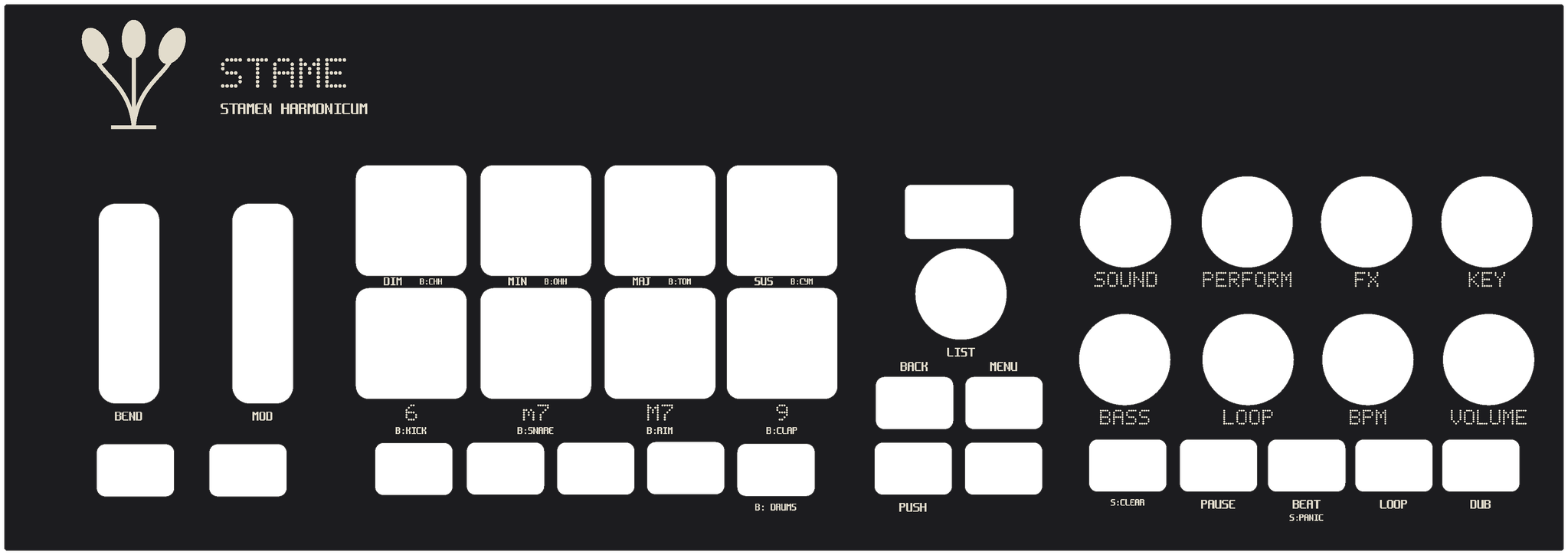
The MPK sits on the left under an engraved black mask that rests on it; the macro pad on the right in line with the keys, in a cradle like the Flip's; the Flip behind the pad, with the screen at 65°. One black top from side to side; the hub and the cables sit underneath, covered.
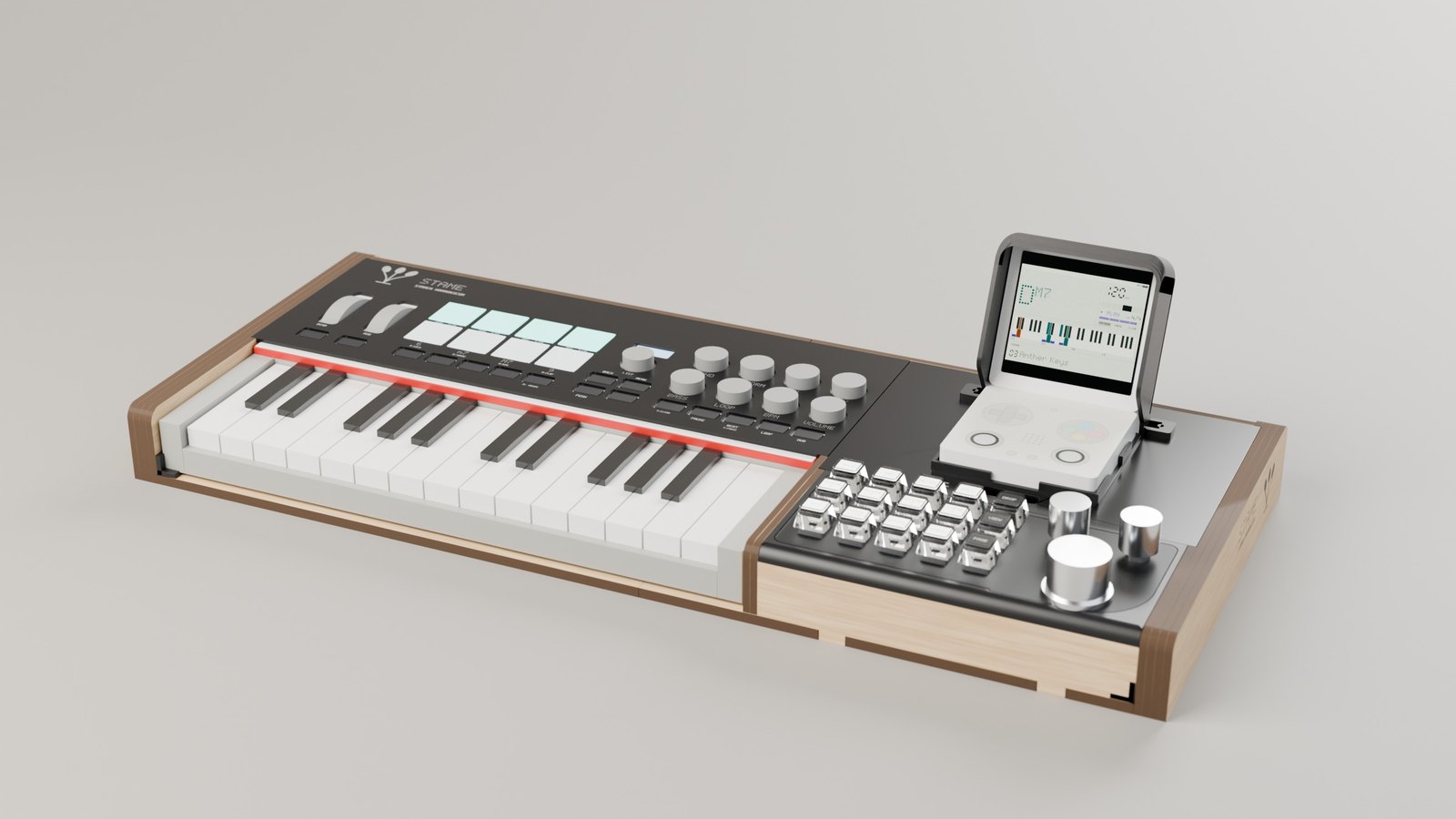
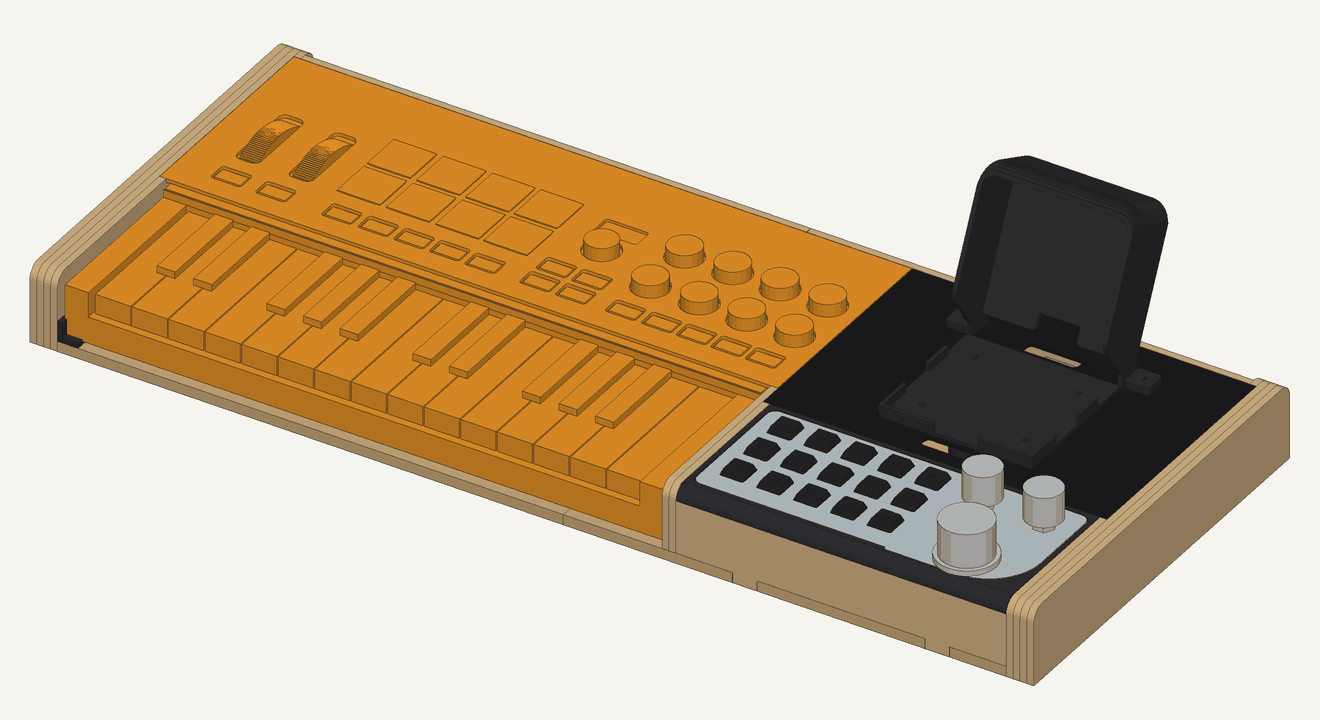
Five sheets
Two of 4 mm birch and two of 6 mm birch, 390 × 390 for an AtomStack S10, and one of black acrylic. SVG for LightBurn and DXF, each sheet nested by material.
Six STL files, one sheet of labels
In PETG: the Flip's cradle, the visor, the pad's cradle, the hub holder, the post, six M3 brackets. The pad gets clear two-layer keycaps, with a paper label under each cover, printed in the Matrice dots.
SketchUp, OBJ
Forty parts on nine layers, one scene per assembly step; the same model as OBJ for any other program, in millimetres.
Nine steps
Parts and hardware on the cover, one step per page, the checks before cutting at the end. In Italian, like the manual.
Not cut yet. Before the laser runs, the mask's paper template goes on the MPK, and a test cut sets the play of the tabs. Everything is generated by five Python scripts in hardware/case from one file of measurements, each marked with where it comes from.
What works today, what is specified and not built yet.
Honest list. The showcase on the Flip is version 0.1: it plays, it loops, it has a demo; it is not the finished instrument.
Running on the Flip
- Chords from pads and keys, extensions, Secret Chords, Chord and Bass Voicing, Split / Octave, Key mode, transpose, Play Style
- The real synth: VA, FM, Reed Piano and the SMP sampler, 232 Stame sounds, 38 basses, FX and reverb
- Performances: Strum, Strum 2 Octaves, Slop, Arpeggiate (1 and 2 octaves), Pattern, Harp, with Lock
- Beat with sixty-four patterns and forty-three kits, sampled and synthesized, metronome in four metres, beat volume; the rolling bass
- AMBIENT: Stame plays almost by itself, slow chords in the key, the bass and sparse notes on loops of different lengths, steered by the pad's knobs and by the player's chords
- Looper: REC with a count-in, four bars, overdub, pause, undo, clear, synced with the transport
- Macro pad: Hold, tap tempo, metronome, fill, four scenes, Options, Save Loop, drums, Panic (held 1 s) and Reset (held 3 s), T13 Drop (held: beat, loop drums and bass fall silent and come back on the beat), T14 Ambient, T15 Page; the two voicing knobs, beat and bass volume
- One instrument: keyboard, pad and Flip together, each command in one place. If a device is missing the others keep their job. The Flip's buttons always work
- The Flip's sticks and triggers: bend and modulation on the left stick, Chord and Bass Voicing on the right one, tap tempo and fill on L2 and R2
- MPK mini IV profile in the DAW preset: pads, keys, knobs, SHIFT as the push, navigation knob with − and +, transport, bank B as drum pads
- The panel: play page, controls page, six views, two themes, lists, platform menu with Panic, four demos
Specified, not built yet
- Save / Save As / Delete of User Sounds; loading a private factory bank from the SD card
- Waiting Room and loop length (Free, 1–16 bars), ten loop slots, soft and hard exit
- The other Mod combinations
- MIDI out to the DIN port of the MPK, MIDI clock, external control
- Pocket Mode (playing with the Flip alone), Learn Pad, MPK status page
- The case: draft 5 complete on paper (cutting sheets, printed parts, SketchUp model, assembly instructions), not cut yet; the heights still to check
- Phase 2: the same core on dedicated hardware (Teensy 4.1 + Audio Shield, probably)
Build on a PC, install over SSH.
You need a Miyoo Flip with a spruceOS-based firmware, an Akai MPK mini IV in its DAW preset, and, optionally, the fifteen-key macro pad on a plain USB 2.0 hub (no Power Delivery) on the Flip's top USB-C port.
The build runs in Git Bash on Windows with Zig as the C compiler (zig cc, cross-compiling for aarch64 glibc 2.27) and the SDL2 headers; the core compiles with no dependency at all. The tests and the portability checks must pass before every commit: the portability target compiles the core as freestanding Cortex-M7 code, to keep phase 2 honest.
sh tools/build.sh test          # core unit tests on the PC
sh tools/build.sh portabilita   # allowed headers, poisoned symbols, Cortex-M7 trial build
sh tools/build.sh render        # offline renderer: PNG frames and WAV of the demo
python -I tools/campioni.py     # downloads the CC0 samples and builds the bank (once)
sh tools/build.sh pacchetto     # the app for the Flip in build/pacchetto/App/Stame
sh tools/deploy.sh              # copies it over SSH (the Flip's address in tools/flip.ip)
On the Flip, Stame appears under App › Musica. The sample bank is built on the PC from tools/campioni.py (it needs numpy and soundfile) and shipped next to the binary; without it the sampled sounds and kits stay silent, everything else plays.
Playing it, in three lines
Hold a pad, press a key. Top row Dim, Min, Maj, Sus; bottom row the extensions 6, m7, M7, 9. The key gives the root; the big knob of the pad moves the voicing window.
Turn a knob, the band answers. K1 Sound, K2 Perform, K3 FX, K4 Key, K5 Bass, K6 Loop, K7 BPM, K8 Volume; hold SHIFT and touch a knob to «push» it. Hold T13 for a drop: beat, loop drums and bass go quiet and come back on the next beat.
REC, play four bars, ⊕ to overdub. The transport buttons of the MPK are the looper; STOP/PLAY starts the beat; T11 turns the keys into drums and T10 puts the loop aside. T12 held for a second is Panic, three seconds is Reset.
The Italian manual and the one-page quick reference have all of it.
Specification first, then code.
The functional specification
Seven sections: overview, chords and performance, sound, interface, MIDI and controls, the Flip platform, the case. Every requirement has an ID and a source tag: [M] manual, [O] observed, [D] deduced, [V] to verify on a real unit. Open questions are listed, not hidden.
Manual and quick reference
How to play the showcase on the Flip: the rig, chords, every control and its gestures, the looper step by step, beats, the macro pad with Hold, scenes, fill, Lock / View / Page, the live drum machine, the Flip's pages and menu, what to do when something is red.
The identity
The story, the mark, the two themes, the dot-matrix font drawn for Stame, the seven-segment digits, the botanical plate, the sound logo of the boot. The same language on the screen and on the case.
The case
A birch plywood console with an engraved black acrylic mask over the MPK, one black top, a cradle for the pad and one for the Flip, which holds the screen at 65°. Generated from a table of measurements: SVG and DXF for the laser, STL for the printer, a SketchUp model and the assembly instructions.
Open, and careful about what is not ours.
| What | Licence | Where |
|---|---|---|
| Stame: code, specification, identity, case | MIT, © 2026 Luigi Massari | LICENSE |
| Sample bank: pianos, mallets, harp, organ, winds, drums | CC0 1.0: Versilian Community Sample Library (VCSL) and the Sonic Pi sample set (freesound.org) | assets/campioni/FONTI.md |
| Spleen bitmap font | BSD 2-Clause, Frederic Cambus | third_party/spleen |
| Matrice dot font, mark, sounds, beats, «Acacia» | Made for Stame, MIT with the rest | src/gfx, tools/matrice.py, tools/patch.py, tools/demo.py |
The repository contains no factory data of the original: no presets, no firmware, no sample of its sounds. Its behaviour is described from the public manual and from listening, and every requirement says where it comes from. If you own the original, the open questions marked [V] in the specification are the ones only you can answer.